Product Autopilot NEW
The headline feature. Autonomous research → AI ideation → swipe interface → agent build → PR. Point it at any product and it runs a continuous improvement loop. Your only job is the swipe.
Your products improve themselves — 24/7 — while you sleep. Autensa researches your market, generates feature ideas, lets you decide with a swipe, and builds them. Automatically.
Email or SMS updates only. No spam, unsubscribe anytime.
We will never sell, rent, or share your information. Notifications only. Unsubscribe anytime. See our Terms & Privacy Policy.
The worlds first state-of-the-art Autonomous Product Engine (APE)
Kanban board, agent sidebar, live event feed — click to expand
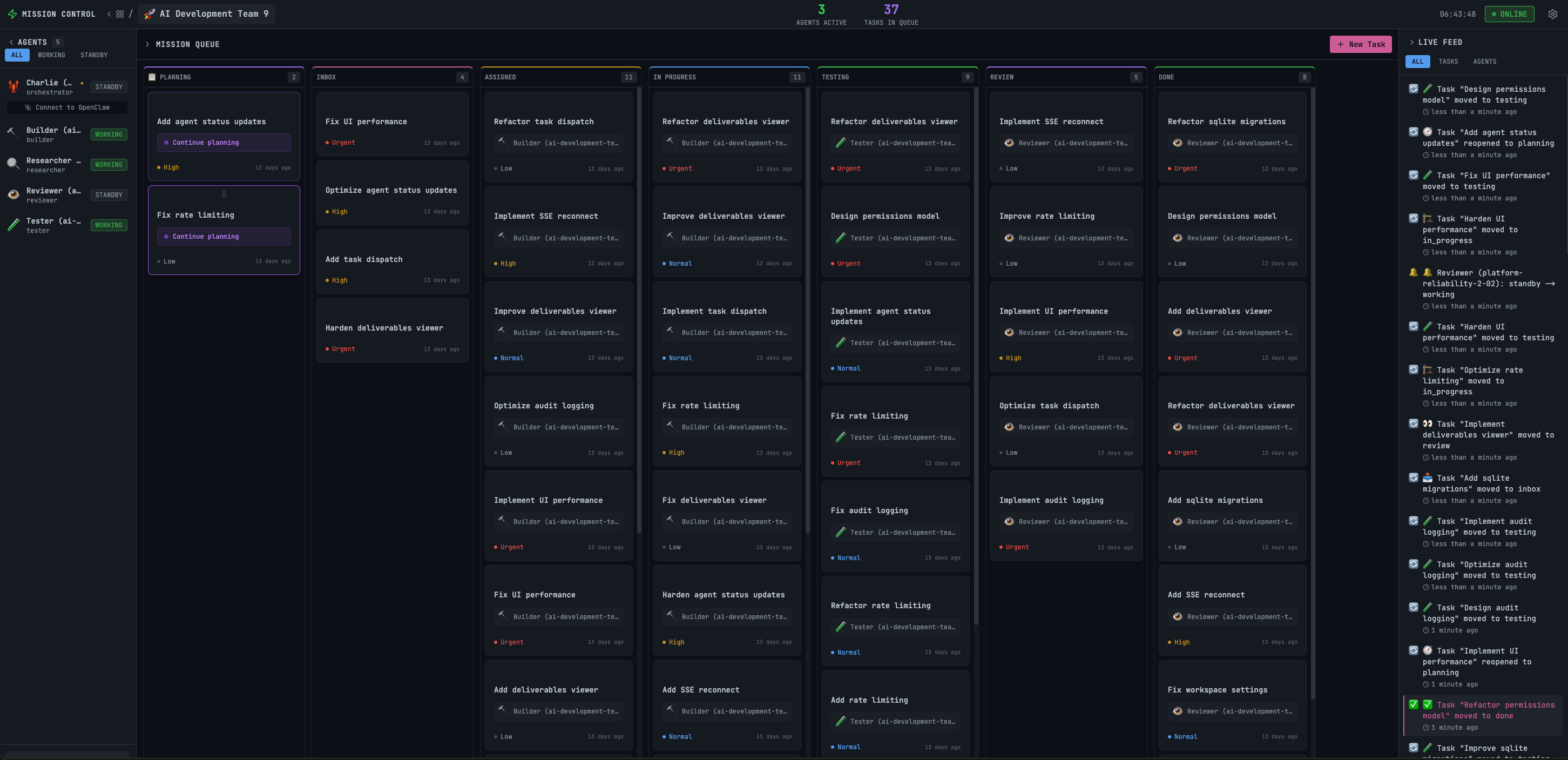
Point Autensa at any product. It runs a continuous improvement loop. Your only job is the swipe.
AI agents analyze your codebase, scan your live site, and research competitors, SEO gaps, and user intent — automatically on a schedule.
Research feeds ideation agents that produce scored feature ideas with impact, feasibility, size estimates, and technical approach.
Ideas appear as cards. Pass, Maybe, Yes, or Now! — your preference model learns from every swipe.
Approved ideas flow through the full pipeline: Build → Test → Review → Pull request on GitHub.
Completed work becomes a PR. The learner agent captures what worked. The next cycle is smarter.
From market research to pull request — Autensa handles the entire product development lifecycle.
The headline feature. Autonomous research → AI ideation → swipe interface → agent build → PR. Point it at any product and it runs a continuous improvement loop. Your only job is the swipe.
Inspired by Andrej Karpathy's AutoResearch. AI agents analyze your codebase, scan your live site, research competitors, SEO gaps, and user intent — automatically on a schedule. Research feeds directly into ideation.
Adapted from Karpathy's program.md pattern. A living document that instructs research and ideation agents. Evolves as swipe data accumulates — the system learns your taste.
Tinder-style card review. Pass, Maybe, Yes, or Now! Each swipe trains a per-product preference model. Ideas get sharper every iteration.
Large features decomposed into subtasks with a visual dependency graph. 3–5 agents work simultaneously with health monitoring and crash recovery.
Talk to agents mid-build. Queued notes delivered at checkpoints, or direct messages for real-time course correction. Full chat history per task.
Per-task and per-product cost tracking. Daily and monthly budget caps that auto-pause dispatch when exceeded. Full cost breakdown by agent and model.
Agent progress saved at checkpoints. If a session crashes, work resumes from the last checkpoint — not from scratch. Checkpoint history per task.
Learner agent captures lessons from every build. Knowledge entries injected into future dispatches so agents don't repeat mistakes.
Git worktrees for repo-backed projects, task sandboxes for local builds. Port allocation (4200–4299), serialized merge queue with conflict detection.
Drag-and-drop across 7 status columns. AI planning phase with clarifying Q&A. Multi-agent planning specs with approval gates.
Multi-agent pipeline: Builder → Tester → Reviewer → Learner. Auto health monitoring with stall detection and auto-nudge.
Real-time SSE stream of everything — research progress, build events, test results, agent health, cost updates. Filterable by product and agent.
Set the automation level per product. Change it anytime.
| Tier | Behavior | Best For |
|---|---|---|
| Supervised | PRs created automatically. You review and merge manually. | Production apps |
| Semi-Auto | PRs auto-merge when CI passes and review agent approves. | Staging & trusted repos |
| Full Auto | Everything automated end-to-end. Idea → deployed feature. | Side projects & MVPs |
Autensa connects to OpenClaw Gateway via WebSocket. The Autopilot Engine runs the research → ideation → build loop. All data stays local in SQLite.
Clone the repo, configure your environment, and start shipping on autopilot. Or use the Setup Wizard for guided configuration.
# Clone and install
git clone https://github.com/crshdn/mission-control.git
cd mission-control
npm install

# Configure environment
cp .env.example .env.local
# Edit .env.local with your OpenClaw token

# Start Autensa
npm run dev
# Open http://localhost:4000# Install OpenClaw globally
npm install -g openclaw
# Start the gateway
openclaw gateway start
# Gateway runs on port 18789
# Autensa connects automatically
# via WebSocketThe biggest release yet. From task orchestration dashboard to the world's first autonomous product engine.
Full research → ideation → swipe → build pipeline. Point it at a product, swipe on ideas, watch PRs appear.
Parallel multi-agent execution with dependency graphs, health monitoring, crash recovery, and inter-agent messaging.
Talk to agents mid-build. Queued notes or direct messages for real-time course correction.
Per-task, per-product cost tracking with daily/monthly caps that auto-pause dispatch.
Every layer of Autensa is hardened — from API authentication to error handling.
API authentication with MC_API_TOKEN. Same-origin browser requests are auto-allowed without a token.
Agent completion webhooks validated with X-Webhook-Signature header to prevent spoofing.
All request payloads validated with Zod schemas before processing. Malformed data never reaches business logic.
File downloads use realpathSync to validate paths within the allowed directory. No directory escape.
X-Frame-Options, X-Content-Type-Options, Referrer-Policy, and Permissions-Policy on every response.
API errors never leak internal details like stack traces or file paths in production mode.
Choose the deployment method that fits your infrastructure.
Persistent volumes for data and workspace. Runs as non-root with dumb-init. Built-in health checks.
# Start with Docker Compose
docker compose up -d

# Persistent volumes:
#   mission-control-data
#   mission-control-workspace

# Health check built in
docker compose psStandard Node.js deployment. Build once, run on any machine with Node 18+.
# Build for production
npm run build

# Start on port 4000
npx next start -p 4000

# Or use a process manager
pm2 start npm -- startRun Autensa on one machine and OpenClaw on another. Connect them over your local network or a Tailscale mesh.
# Point to the machine running OpenClaw
OPENCLAW_GATEWAY_URL=ws://YOUR_SERVER_IP:18789Use Tailscale for secure, zero-config networking between machines. No port forwarding needed.
# Use your Tailscale hostname (WSS for encrypted)
OPENCLAW_GATEWAY_URL=wss://your-machine.tailnet-name.ts.netAll configuration is done through environment variables in .env.local.
| Variable | Required | Default | Description |
|---|---|---|---|
| OPENCLAW_GATEWAY_URL | Yes | ws://127.0.0.1:18789 | WebSocket URL to OpenClaw Gateway |
| OPENCLAW_GATEWAY_TOKEN | Yes | — | Authentication token for OpenClaw |
| MC_API_TOKEN | No | — | API auth token (enables auth middleware) |
| WEBHOOK_SECRET | No | — | HMAC secret for webhook validation |
| DATABASE_PATH | No | ./mission-control.db | SQLite database location |
| WORKSPACE_BASE_PATH | No | ~/Documents/Shared | Base directory for workspace files |
| PROJECTS_PATH | No | ~/Documents/Shared/projects | Directory for project folders |
openclaw gateway status to verify the gateway is running. Check that OPENCLAW_GATEWAY_URL and OPENCLAW_GATEWAY_TOKEN are set correctly in your .env.local. If connecting across machines, make sure port 18789 is open in your firewall.
openclaw logs. Verify your AI provider API key (Anthropic or OpenAI) is configured in OpenClaw. Try refreshing the page and clicking the task again to re-trigger the planning flow.
lsof -i :4000, then stop it with kill -9 PID. Alternatively, change the port with npx next start -p 4001.
NO_PROXY=localhost,127.0.0.1 in your environment so agent completion webhooks bypass the proxy and reach Autensa directly.
rm mission-control.db (or whatever path DATABASE_PATH is set to). Autensa auto-creates a fresh database with all 21 migrations on next startup.
Autensa is MIT licensed and actively maintained. Pull requests welcome — join the community and help build the future of autonomous product development.


